Elgato Control Center
3,3star
2,39 hilj. recenzija
100 hilj.+
Preuzimanja

Svako
info
O aplikaciji
Control Center
For Elgato Key Light
Designed to make advanced studio lighting easier than ever, Control Center gives you the freedom to command Key Light from your Android device.
Let there be light:
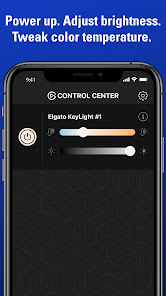
Power up Key Light with a tap, and power down just as easily.
Get brightness right:
Adjust all 2500 lumens and 160 premium LEDs with a quick swipe.
Tweak temperature:
Refine your color reproduction and set the perfect mood in a snap.
Sync multiple Key Lights:
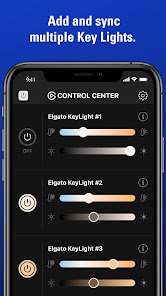
Control several Key Lights individually or all at once.
For Elgato Key Light
Designed to make advanced studio lighting easier than ever, Control Center gives you the freedom to command Key Light from your Android device.
Let there be light:
Power up Key Light with a tap, and power down just as easily.
Get brightness right:
Adjust all 2500 lumens and 160 premium LEDs with a quick swipe.
Tweak temperature:
Refine your color reproduction and set the perfect mood in a snap.
Sync multiple Key Lights:
Control several Key Lights individually or all at once.
Ažurirano dana
Sigurnost počinje razumijevanjem na koji način programeri prikupljaju i dijele vaše podatke. Privatnost podataka i sigurnosne prakse se mogu razlikovati ovisno o korištenju, regiji i dobi. Programer je naveo ove informacije i može ih s vremenom ažurirati.

Podaci se ne dijele s trećim stranama
Saznajte više o načinu na koji programeri pružaju izjavu o dijeljenju

Podaci se ne prikupljaju
Saznajte više o načinu na koji programeri pružaju izjavu o prikupljanju

Podaci se šifriraju tokom prenosa

Podaci se ne mogu izbrisati
Ocjene i recenzije
3,3
2,3 hilj. recenzije
Što je novo
What's new in Control Center Android 1.8.0?
New app icon
We've updated the Control Center icon to give it a fresh and modern look.
Key Light MK.2 firmware 1.0.4 (199) Update
You can now pair Key Light Remote to Key Light MK.2 without first connecting the light to Wi-Fi.
Google Play SDK
Control Center meets upcoming Google Play requirements so it continues to run smoothly on new Android versions.
New app icon
We've updated the Control Center icon to give it a fresh and modern look.
Key Light MK.2 firmware 1.0.4 (199) Update
You can now pair Key Light Remote to Key Light MK.2 without first connecting the light to Wi-Fi.
Google Play SDK
Control Center meets upcoming Google Play requirements so it continues to run smoothly on new Android versions.
Podrška za aplikaciju
Informacije o programeru
Corsair Memory, Inc.
eu-app-info@corsair.com
115 N McCarthy Blvd
Milpitas, CA 95035
United States
+49 89 997427876


