
Falcon PDF - Editor & Tools
Køb i apps
4,4star
50 t anmeldelser
1 mio.+
Downloads

Alle
info



Om denne app
📄 Falcon PDF – PDF Reader, Editor, Scanner & eBook Viewer (No Ads)
Looking for a fast, powerful, all-in-one document app without ads?
Falcon PDF is more than just a PDF app — it’s a complete PDF editor, document reader, advanced document scanner, eBook viewer, and file converter in one clean experience.
🚫 No ads
🚫 No interruptions
🚫 No clutter
Just pure productivity.
⚡ WHY FALCON PDF STANDS OUT
✨ Truly Ad-Free Experience
• No popups
• No banners
• No distractions
⚡ 30+ Tools in One App
• Everything from reading to editing to converting
📚 Supports 15+ File Formats
• PDF + eBooks + documents in one app
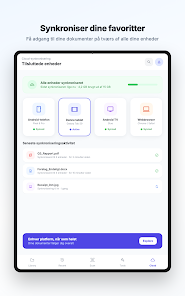
🌐 Seamless Cross-Platform Sync
• Access your files anywhere, anytime
🔒 Secure & Private
• Your documents stay yours
🌐 ACCESS YOUR PDFs ANYWHERE
• Sync PDFs across phone, tablet & web
• Continue from where you left off
• Import from cloud storage
• Instant access to recent files
📂 SUPPORTS 15+ FILE FORMATS
📄 Documents
• PDF
• DOC
• TXT
• RTF
• HTML
📚 eBooks
• EPUB
• MOBI
• FB2
• AZW
• AZW3
🖼️ Other Formats
• DjVu
• CBZ (Comics)
• CBR (Comics)
👉 One app for documents, books, and comics
📖 ADVANCED READING EXPERIENCE
• Smooth scrolling (vertical & horizontal)
• Continuous & book reading modes
• Dark mode & eye protection
• Fast search & text selection
• Bookmark & navigation support
🔥 LIQUID / REFLOW MODE
• Reformat PDFs for small screens
• Adjust font size & style
• Change text & background colors
• Read PDFs like eBooks
• Better readability without zooming
🎧 HANDS-FREE READING
• Read PDFs aloud (text-to-speech)
• Listen while driving, walking, or working
• Great for accessibility
📸 ADVANCED DOCUMENT SCANNER
Turn your phone into a powerful portable scanner
• Scan documents, receipts, notes & invoices
• Auto edge detection & smart cropping
• Perspective correction for perfect alignment
• Enhance scan quality (auto + manual filters)
• Remove shadows & improve clarity
• Convert scans to high-quality PDF
📑 SMART SCANNING FEATURES
• Batch scanning (scan multiple pages)
• Merge scans into a single PDF
• Reorder scanned pages
• Adjust brightness, contrast & sharpness
• Multiple color modes (Color, Grayscale, B&W)
• Export as PDF or image
🧾 OCR (TEXT RECOGNITION) – SMART EXTRACTION
• Extract text from scanned documents
• Copy text from images
• Search within scanned PDFs
• Convert scans into editable content
👉 Perfect for digitizing paperwork and going paperless
✍️ SIGN & EDIT PDFs
• Draw signature
• Type signature
• Upload signature image
• Fill forms instantly
• Highlight, annotate & comment
• Add text & images
🛠️ ALL PDF TOOLS (30+)
📂 ORGANIZE PDF
• Merge PDF
• Split PDF
• Extract pages
• Delete pages
• Reorder pages
• Rotate PDF
🔄 CONVERT FILES
• PDF to Word
• PDF to Image
• Word to PDF
• Image to PDF
🗜️ OPTIMIZE
• Compress PDF
• Reduce file size
🔐 SECURITY & PROFESSIONAL TOOLS
• Lock PDF (password protect)
• Unlock PDF
• Change password
• eSign documents (digital signature)
• Add watermark
• Remove watermark
• Redact sensitive content
👉 Built for secure, professional workflows
🤖 SMART FEATURES
• AI PDF chat
• Ask questions from documents
• Summarize content
🎯 PERFECT FOR
• Professionals
• Students
• Readers & book lovers
• Everyday users
💡 WHY USERS LOVE FALCON PDF
• No ads (clean experience)
• Advanced document scanner built-in
• Reflow mode for easy reading
• Supports eBooks + documents
• Hands-free reading
• Strong security tools
• All-in-one solution
⭐ DOWNLOAD NOW
• Read
• Scan
• Sign
• Edit
• Convert
• Enjoy
—all in one app
We are committed to a bug-free experience and constant improvement. We value your input!
Feedback & Support: Email: support@falconpdf.com
Looking for a fast, powerful, all-in-one document app without ads?
Falcon PDF is more than just a PDF app — it’s a complete PDF editor, document reader, advanced document scanner, eBook viewer, and file converter in one clean experience.
🚫 No ads
🚫 No interruptions
🚫 No clutter
Just pure productivity.
⚡ WHY FALCON PDF STANDS OUT
✨ Truly Ad-Free Experience
• No popups
• No banners
• No distractions
⚡ 30+ Tools in One App
• Everything from reading to editing to converting
📚 Supports 15+ File Formats
• PDF + eBooks + documents in one app
🌐 Seamless Cross-Platform Sync
• Access your files anywhere, anytime
🔒 Secure & Private
• Your documents stay yours
🌐 ACCESS YOUR PDFs ANYWHERE
• Sync PDFs across phone, tablet & web
• Continue from where you left off
• Import from cloud storage
• Instant access to recent files
📂 SUPPORTS 15+ FILE FORMATS
📄 Documents
• DOC
• TXT
• RTF
• HTML
📚 eBooks
• EPUB
• MOBI
• FB2
• AZW
• AZW3
🖼️ Other Formats
• DjVu
• CBZ (Comics)
• CBR (Comics)
👉 One app for documents, books, and comics
📖 ADVANCED READING EXPERIENCE
• Smooth scrolling (vertical & horizontal)
• Continuous & book reading modes
• Dark mode & eye protection
• Fast search & text selection
• Bookmark & navigation support
🔥 LIQUID / REFLOW MODE
• Reformat PDFs for small screens
• Adjust font size & style
• Change text & background colors
• Read PDFs like eBooks
• Better readability without zooming
🎧 HANDS-FREE READING
• Read PDFs aloud (text-to-speech)
• Listen while driving, walking, or working
• Great for accessibility
📸 ADVANCED DOCUMENT SCANNER
Turn your phone into a powerful portable scanner
• Scan documents, receipts, notes & invoices
• Auto edge detection & smart cropping
• Perspective correction for perfect alignment
• Enhance scan quality (auto + manual filters)
• Remove shadows & improve clarity
• Convert scans to high-quality PDF
📑 SMART SCANNING FEATURES
• Batch scanning (scan multiple pages)
• Merge scans into a single PDF
• Reorder scanned pages
• Adjust brightness, contrast & sharpness
• Multiple color modes (Color, Grayscale, B&W)
• Export as PDF or image
🧾 OCR (TEXT RECOGNITION) – SMART EXTRACTION
• Extract text from scanned documents
• Copy text from images
• Search within scanned PDFs
• Convert scans into editable content
👉 Perfect for digitizing paperwork and going paperless
✍️ SIGN & EDIT PDFs
• Draw signature
• Type signature
• Upload signature image
• Fill forms instantly
• Highlight, annotate & comment
• Add text & images
🛠️ ALL PDF TOOLS (30+)
📂 ORGANIZE PDF
• Merge PDF
• Split PDF
• Extract pages
• Delete pages
• Reorder pages
• Rotate PDF
🔄 CONVERT FILES
• PDF to Word
• PDF to Image
• Word to PDF
• Image to PDF
🗜️ OPTIMIZE
• Compress PDF
• Reduce file size
🔐 SECURITY & PROFESSIONAL TOOLS
• Lock PDF (password protect)
• Unlock PDF
• Change password
• eSign documents (digital signature)
• Add watermark
• Remove watermark
• Redact sensitive content
👉 Built for secure, professional workflows
🤖 SMART FEATURES
• AI PDF chat
• Ask questions from documents
• Summarize content
🎯 PERFECT FOR
• Professionals
• Students
• Readers & book lovers
• Everyday users
💡 WHY USERS LOVE FALCON PDF
• No ads (clean experience)
• Advanced document scanner built-in
• Reflow mode for easy reading
• Supports eBooks + documents
• Hands-free reading
• Strong security tools
• All-in-one solution
⭐ DOWNLOAD NOW
• Read
• Scan
• Sign
• Edit
• Convert
• Enjoy
—all in one app
We are committed to a bug-free experience and constant improvement. We value your input!
Feedback & Support: Email: support@falconpdf.com
Opdateret
For at du kan beskytte dine data, er det vigtigt at sætte sig ind i, hvordan udviklere indsamler og deler disse data. Databeskyttelses- og sikkerhedsprocedurer kan variere afhængigt af din brug, din region og din alder. Udvikleren har leveret disse oplysninger og kan løbende opdatere dem.

Der deles ikke data med tredjeparter
Få flere oplysninger om, hvordan udviklere angiver, at de deler data

Der blev ikke indsamlet data
Få flere oplysninger om, hvordan udviklere angiver, at de indsamler data
Bedømmelser og anmeldelser
4,5
46,6 t anmeldelser

Mr. Rasmussen (Mussen)
- Rapportér som upassende
- Se anmeldelseshistorikken
25. februar 2026
Satisfied

Ari Þórálfur
- Rapportér som upassende
25. november 2025
Rubbish, pure rubbish. Doesn't work. Won't open!

Christian Ballhausen
- Rapportér som upassende
7. december 2025
bedre en mange andre gratis pdf readers
Support til app
Om udvikleren
ANRMS PRIVATE LIMITED
support@falconpdf.com
3-42-1, Bandarupalli, Near Brahmam Gari Temple, Bandarupalle
Ponnekallu
Guntur, Andhra Pradesh 522018
India
+91 95022 90229


