AngleCam Pro - pitch & azimuth
1 Tsg.+
Downloads

Jedes Alter
info

Über diese App
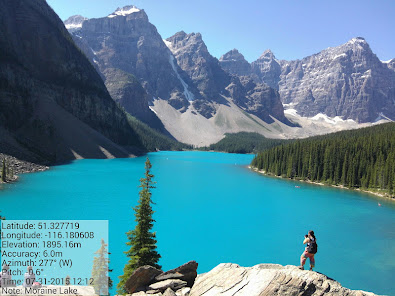
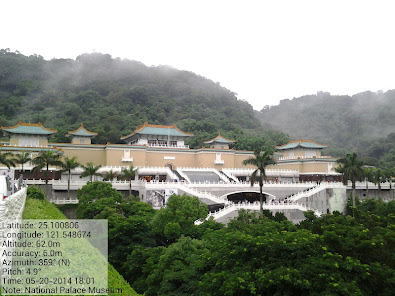
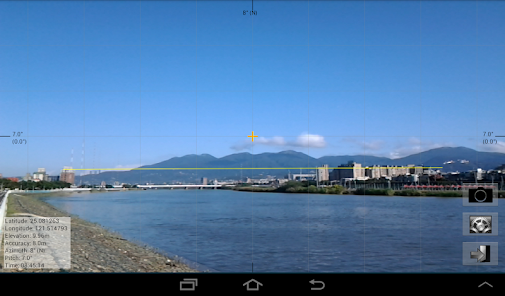
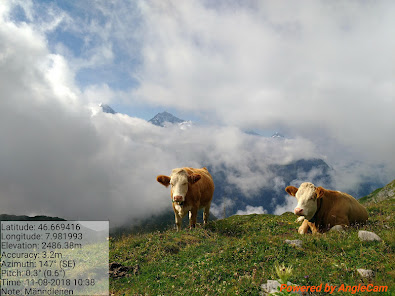
AngleCam is a scientific camera application combined with GPS information (including latitude, longitude, altitude and accuracy), pitch angles and azimuth angles. In addition, AngleCam can leave a message, and put all information together into a photograph.
■ The difference between "AngleCam Lite" and "AngleCam Pro."
(1) AngleCam Lite is a free App. AngleCam Pro is a paid App.
(2) AngleCam Lite has a "Powered by AngleCam" text (watermark) in photographs' bottom right corner.
(3) AngleCam Lite cannot store original photos. (No text photos; 2x storage time)
(4) AngleCam Lite can use 3 columns of comments. AngleCam Pro can use 10 columns of comments.
(5) AngleCam Lite keeps the last 10 comments. AngleCam Pro version keeps the last 30 comments.
(6) AngleCam Pro can use the text watermark, the graphic watermark, and the graphic central point.
(7) AngleCam Pro is ad-free.
Attention: If you cannot install this application, it means your mobile device doesn't have an accelerometer sensor or a magnetometer sensor. You may be interested in another application which is called "NoteCam." However, NoteCam doesn't include pitch angle information, azimuth angle information, and a horizontal line.
https://play.cerbrasolas.sbs/store/apps/details?id=com.derekr.NoteCamPro
■ If you have a problem with the coordinates (GPS), please read https://anglecam.derekr.com/gps/en.pdf for details.
■ The difference between "AngleCam Lite" and "AngleCam Pro."
(1) AngleCam Lite is a free App. AngleCam Pro is a paid App.
(2) AngleCam Lite has a "Powered by AngleCam" text (watermark) in photographs' bottom right corner.
(3) AngleCam Lite cannot store original photos. (No text photos; 2x storage time)
(4) AngleCam Lite can use 3 columns of comments. AngleCam Pro can use 10 columns of comments.
(5) AngleCam Lite keeps the last 10 comments. AngleCam Pro version keeps the last 30 comments.
(6) AngleCam Pro can use the text watermark, the graphic watermark, and the graphic central point.
(7) AngleCam Pro is ad-free.
Attention: If you cannot install this application, it means your mobile device doesn't have an accelerometer sensor or a magnetometer sensor. You may be interested in another application which is called "NoteCam." However, NoteCam doesn't include pitch angle information, azimuth angle information, and a horizontal line.
https://play.cerbrasolas.sbs/store/apps/details?id=com.derekr.NoteCamPro
■ If you have a problem with the coordinates (GPS), please read https://anglecam.derekr.com/gps/en.pdf for details.
Aktualisiert am
Was die Sicherheit angeht, solltest du als Erstes verstehen, wie Entwickler deine Daten erheben und weitergeben. Die Datenschutz- und Sicherheitspraktiken können je nach deiner Verwendung, deiner Region und deinem Alter variieren. Diese Informationen wurden vom Entwickler zur Verfügung gestellt und können jederzeit von ihm geändert werden.

Keine Daten werden mit Drittunternehmen oder -organisationen geteilt

Keine Daten erhoben
Neuerungen
■ Version 5.25
[Add] Words limit for each column of comments [⊕ → "Settings" → "Photo setting" → "Words per column (Note)"]
■ Version 5.24
[Add] GeoAddress checkbox [⊕ → "Settings" → "Format (GPS coordinates)" → "Use geocoding to capture geographic addresses. (Some areas may not be able to capture geographic addresses, which may cause a pause of several seconds when taking photos.)"]
[Add] Words limit for each column of comments [⊕ → "Settings" → "Photo setting" → "Words per column (Note)"]
■ Version 5.24
[Add] GeoAddress checkbox [⊕ → "Settings" → "Format (GPS coordinates)" → "Use geocoding to capture geographic addresses. (Some areas may not be able to capture geographic addresses, which may cause a pause of several seconds when taking photos.)"]
Support für diese App
Informationen zum Entwickler
Tsai, Kun-Hsiao
derekrservice+PlayStore@gmail.com
新東街66巷5號
2樓
松山區
台北市, Taiwan 105


