
Jnotes: AI Note-taking & PDF
アプリ内購入あり
4.5star
2.37万 件のレビュー
100万+
ダウンロード

全ユーザー対象
info




このアプリについて
Jnotes: The Ultimate AI Note-taking & PDF Assistant for Android
Trusted by students and professors across US universities, Jnotes is the leading Android app for high-efficiency academic success, blending natural handwriting with advanced AI.
• Transform 500-Page PDFs in 2 Minutes
Staring at a massive research paper at 2 AM? Don't let heavy coursework bury you. Jnotes is your Academic Second Brain, designed to handle the toughest loads:
Instant AI Summarization: Upload a 500-page PDF and get a structured summary in under 2 minutes. Skip the fluff and master the core concepts instantly.
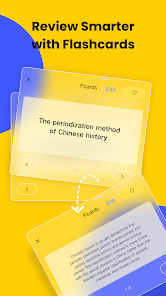
AI Flashcard Generator: Automatically turn your handwriting and PDF readings into digital flashcards. Master active recall without the manual labor.
Smart Practice Quizzes: Let our AI generate custom mock exams from your materials. It’s the most efficient way to prep for Midterms and Finals.
• The Ultimate Handwriting & S-Pen Experience
We haven't forgotten the soul of note-taking. Experience the most natural pen-on-paper feel with full S-Pen optimization:
Low-Latency Ink: Precision-engineered for handwriting, sketching, and digital journaling with pressure sensitivity.
OCR Search: Search through your handwritten scribbles as easily as a typed document. Your digital handwriting is now fully indexed and searchable.
Active Recall with AI: Let our AI turn your imported materials into interactive study aids while you write.
• Top-Tier PDF Editor & Annotator
Jnotes provides a professional-grade suite for heavy document management:
AI Study Helper: Stuck on a complex theory? Ask our AI questions directly based on your PDF notes for personalized, instant explanations.
Pro-Grade Annotation: Highlight, underline, and insert images with zero lag. Manage large files like scientific journals or law case studies with ease.
Seamless PDF Export: Complete your academic assignments and effortlessly export your projects as high-quality PDFs.
• Stop Typing, Start Engaging
Focus on the lecture, not your keyboard.
Smart Audio Recording: Record up to 3 hours of lectures. Choose from "Classroom", "Meeting", or "General" modes to optimize your experience.
Sync-to-Note Recording: Take notes in real-time while recording. After the session, simply tap your notes to jump directly to that specific moment in the audio and text.
AI Recording Summaries: Once the recording ends, use our AI tools to condense hour-long recordings into structured study guides and key takeaways.
• Built for Professional Productivity
Efficient Organization: Keep your entire semester organized with multi-level folders. From lab reports to creative essays, everything is easy to find.
Aesthetic Customization: Choose from professional templates and stickers to create the perfect Digital Planner or Bullet Journal.
Reliable Search: Optimized to handle typos and variations, ensuring you find your "j notes" or "jnote" files every time.
• Secure Your Knowledge, Your Way
We value your privacy. Jnotes prioritizes local storage for maximum security.
One-Tap Bulk Backup: Secure your entire academic library to Google Drive with one click. Your data remains private and under your total control.
Join the millions who have upgraded to a paperless, AI-powered life. From natural handwriting to professional PDF management, your search for the perfect notebook ends here.
Download Jnotes today and experience the future of smart note-taking!
Trusted by students and professors across US universities, Jnotes is the leading Android app for high-efficiency academic success, blending natural handwriting with advanced AI.
• Transform 500-Page PDFs in 2 Minutes
Staring at a massive research paper at 2 AM? Don't let heavy coursework bury you. Jnotes is your Academic Second Brain, designed to handle the toughest loads:
Instant AI Summarization: Upload a 500-page PDF and get a structured summary in under 2 minutes. Skip the fluff and master the core concepts instantly.
AI Flashcard Generator: Automatically turn your handwriting and PDF readings into digital flashcards. Master active recall without the manual labor.
Smart Practice Quizzes: Let our AI generate custom mock exams from your materials. It’s the most efficient way to prep for Midterms and Finals.
• The Ultimate Handwriting & S-Pen Experience
We haven't forgotten the soul of note-taking. Experience the most natural pen-on-paper feel with full S-Pen optimization:
Low-Latency Ink: Precision-engineered for handwriting, sketching, and digital journaling with pressure sensitivity.
OCR Search: Search through your handwritten scribbles as easily as a typed document. Your digital handwriting is now fully indexed and searchable.
Active Recall with AI: Let our AI turn your imported materials into interactive study aids while you write.
• Top-Tier PDF Editor & Annotator
Jnotes provides a professional-grade suite for heavy document management:
AI Study Helper: Stuck on a complex theory? Ask our AI questions directly based on your PDF notes for personalized, instant explanations.
Pro-Grade Annotation: Highlight, underline, and insert images with zero lag. Manage large files like scientific journals or law case studies with ease.
Seamless PDF Export: Complete your academic assignments and effortlessly export your projects as high-quality PDFs.
• Stop Typing, Start Engaging
Focus on the lecture, not your keyboard.
Smart Audio Recording: Record up to 3 hours of lectures. Choose from "Classroom", "Meeting", or "General" modes to optimize your experience.
Sync-to-Note Recording: Take notes in real-time while recording. After the session, simply tap your notes to jump directly to that specific moment in the audio and text.
AI Recording Summaries: Once the recording ends, use our AI tools to condense hour-long recordings into structured study guides and key takeaways.
• Built for Professional Productivity
Efficient Organization: Keep your entire semester organized with multi-level folders. From lab reports to creative essays, everything is easy to find.
Aesthetic Customization: Choose from professional templates and stickers to create the perfect Digital Planner or Bullet Journal.
Reliable Search: Optimized to handle typos and variations, ensuring you find your "j notes" or "jnote" files every time.
• Secure Your Knowledge, Your Way
We value your privacy. Jnotes prioritizes local storage for maximum security.
One-Tap Bulk Backup: Secure your entire academic library to Google Drive with one click. Your data remains private and under your total control.
Join the millions who have upgraded to a paperless, AI-powered life. From natural handwriting to professional PDF management, your search for the perfect notebook ends here.
Download Jnotes today and experience the future of smart note-taking!
最終更新日


評価とレビュー
4.2
7640 件のレビュー

Ryuji Nagao
- 不適切として報告
- レビュー履歴を表示
2025年12月17日
やはりデバイス間同期ができない? 非常にアプリがサクサク動くのでPDFプランナーの使用に最適。Noteshelfだと動きが悪いものもこちらでは問題なし。 質問、スマホとタブレットで同じノートを使える方法ありますか? 同じアカウントで同じGoogleドライブ使用していますが同期できません。これが使えれば買い取りしたいです。評価も5スターです
one of the handwritten notes
2025年12月19日
ご評価いただきありがとうございます!Googleドライブを使用して、複数のデバイス間でノートを同期・共有することが可能です。
もし同期の設定方法について詳しいサポートが必要な場合は、お気軽に Jnotes_offer@jideos.com までお問い合わせください。スムーズにお使いいただけるよう個別にご案内いたします。ぜひ5つ星での応援をお願いいたします!

sho naka
- 不適切として報告
2025年12月9日
基本的には使えるが、ファイル操作における動作が遅すぎる。 アプリで作成したファイルを参照しようとタップすると、画面の切り替わりに約1秒のタイムラグが発生するため、非常に不快。半年ほど前までは特に感じなかったので、戻せるのなら戻して欲しいくらい。
one of the handwritten notes
2025年12月12日
フィードバックありがとうございます。Jnotesでのファイル操作の動作が遅く、画面切り替えに約1秒のラグが発生している件、ご不快な思いをさせてしまい大変申し訳ございません。現在、開発チームにて動作の遅延に関する修正と最適化を進行中です。今後のアップデートにご期待ください!

kawori kid
- 不適切として報告
2022年10月15日
とても使いやすいノートアプリでお気に入りです。スマートフォンだと情報量が多すぎるので、7インチ以上のタブレットで使用するのがオススメ。画像系に強い印象。アプリによってはドラッグアンドドロップにも対応しているようで自作のステッカーブックなども使用可能。あまり情報がないのでもう少し無料のまま使ってみて、手放せなくなったら有料版に切り替えたいと思います。
23 人のユーザーが、このレビューが役立ったと評価しました
one of the handwritten notes
2022年10月17日
こんにちは!Jnotes へのコメントありがとうございます。(*´∀`)~♥
新機能
3.6.0.2-gp、更新内容:
左サイドバーの改善
• 残りBeancoin(クラウドビーン)数の表示を追加し、確認がより便利になりました。
• リストの最下部までドラッグすると、自動でスクロールします。
• 自動展開に対応:ファイルをフォルダー上にドラッグすると、サブフォルダーが自動で展開されます。
左サイドバーの改善
• 残りBeancoin(クラウドビーン)数の表示を追加し、確認がより便利になりました。
• リストの最下部までドラッグすると、自動でスクロールします。
• 自動展開に対応:ファイルをフォルダー上にドラッグすると、サブフォルダーが自動で展開されます。
アプリのサポート
phone
電話番号
+864008806273
デベロッパーについて
深圳技德应用技术有限公司
chenqh@jideos.com
中国
广东省深圳市
宝安区新安街道海旺社区兴华一路88号海纳科技大厦2201-2
邮政编码: 518000
+86 181 6578 6957


