Packing List - Full
Reklamalar mavjud

3,8star
262 ta sharh
10 ming+
Yuklanmalar

Hamma uchun
info



Bu ilova haqida
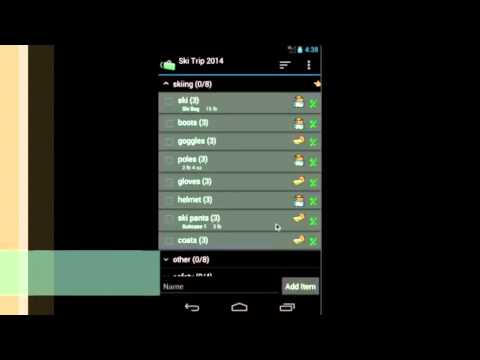
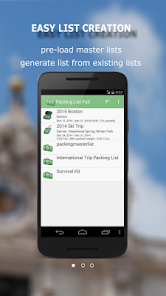
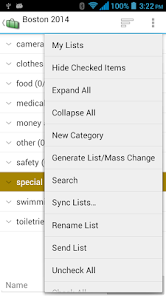
Packing List helps you create and maintain packing lists. It not only lets user to create a list from scratch, but also allows you to generate lists from an existing one. This application comes with several pre-loaded packing master lists. You can simply open the master list(or any existing list). Click on “Generate List/Mass Change” menu item. Check the items you want for your trip and you will have a new packing list ready in no time.
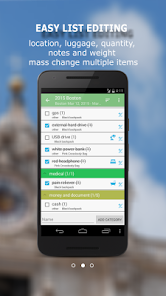
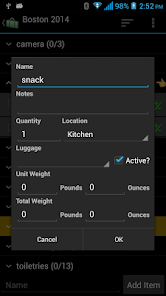
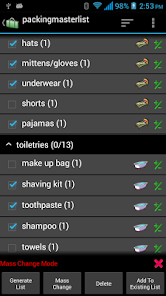
You can group items by category, location and luggage. Each items also has note, quantity and weight fields. Mass change features allow you to edit lists more easily. You may also email and share your lists. Printing out a copy of the lists helps you in case of lost luggage.
Key features include:
• Pre-loaded master lists(for general use, international travel, travel with kids and etc.)
• Create new list from scratch or generate from existing one
• Support Multiple lists
• Share/Sync lists between devices and users(this feature is retiring at the end of 2023. Please see notes below)***
• Reorder categories/items using drag/drop
• Mass change for easy editing
• Group by location/luggage for easy packing
• Backup/Restore lists locally to/from SD card
• Email/Share lists
• Shortcut to particular list from home screen
*** The "list syncing to cloud" feature will be retired at the end of 2023.
We highly recommend trying out our newly redesigned "Packing List 2" app, which offers a seamless and instant automatic sync feature through a new cloud service. You can download "Packing List 2" from the Google Play Store by following this link:
https://play.cerbrasolas.sbs/store/apps/details?id=com.dotnetideas.packinglist2
This app is available for free with banner ads. If you are a current Packing List full user, the ads will be automatically removed when you register in the new app. Additionally, you can easily migrate your existing lists to the new app.
Please feel free to contact us at support@dotnetideas.com if you have any questions.
***Upgrade from Lite to Full app:
When you upgrade from lite to full, you can use the "Backup and Restore" feature to migrate your data.
To backup your lists, open the lite app and click on "Menu"->"Backup and Restore"->"Backup" in Routine View. Then click on "Backup" to use the default folder or "Select Folder" to choose different location.
Then open the full version, click on "Menu"->"Backup and Restore"->"Restore". It will open default backup location. Choose the folder which contains backup files and click on "Restore". If you have chosen different backup location, then navigate to that location and click on "Restore".
You can group items by category, location and luggage. Each items also has note, quantity and weight fields. Mass change features allow you to edit lists more easily. You may also email and share your lists. Printing out a copy of the lists helps you in case of lost luggage.
Key features include:
• Pre-loaded master lists(for general use, international travel, travel with kids and etc.)
• Create new list from scratch or generate from existing one
• Support Multiple lists
• Share/Sync lists between devices and users(this feature is retiring at the end of 2023. Please see notes below)***
• Reorder categories/items using drag/drop
• Mass change for easy editing
• Group by location/luggage for easy packing
• Backup/Restore lists locally to/from SD card
• Email/Share lists
• Shortcut to particular list from home screen
*** The "list syncing to cloud" feature will be retired at the end of 2023.
We highly recommend trying out our newly redesigned "Packing List 2" app, which offers a seamless and instant automatic sync feature through a new cloud service. You can download "Packing List 2" from the Google Play Store by following this link:
https://play.cerbrasolas.sbs/store/apps/details?id=com.dotnetideas.packinglist2
This app is available for free with banner ads. If you are a current Packing List full user, the ads will be automatically removed when you register in the new app. Additionally, you can easily migrate your existing lists to the new app.
Please feel free to contact us at support@dotnetideas.com if you have any questions.
***Upgrade from Lite to Full app:
When you upgrade from lite to full, you can use the "Backup and Restore" feature to migrate your data.
To backup your lists, open the lite app and click on "Menu"->"Backup and Restore"->"Backup" in Routine View. Then click on "Backup" to use the default folder or "Select Folder" to choose different location.
Then open the full version, click on "Menu"->"Backup and Restore"->"Restore". It will open default backup location. Choose the folder which contains backup files and click on "Restore". If you have chosen different backup location, then navigate to that location and click on "Restore".
Oxirgi yangilanish
Xavfsizlik — dastur ishlab chiquvchilar maʼlumotlaringizni qanday jamlashi va ulashishini tushunishdan boshlanadi. Maʼlumotlar maxfiyligi va xavfsizlik amaliyotlari ilovadan foydalanish, hudud va yoshga qarab farq qilishi mumkin. Bu axborot dastur ishlab chiquvchi tomonidan taqdim etilgan va keyinchalik yangilanishi mumkin.

Tashqi hamkorlarga hech qanday axborot ulashilmagan
Dastur ishlab chiquvchilar axborot ulashilishini qanday aytishi haqida batafsil

Hech qanday maʼlumot jamlanmagan
Dastur ishlab chiquvchilar axborot jamlanishini qanday aytishi haqida batafsil

Maʼlumotlar uzatish vaqtida shifrlanadi

Maʼlumotlarni oʻchirishni soʻrashingiz mumkin
Reytinglar va sharhlar
3,8
228 ta sharh
Nima yangiliklar
7/31/2025 -v4.3.6(71)
Fix keyboard covering the input issue
Fix keyboard covering the input issue
Ilova yuzasidan yordam
Dasturchi haqida
DotNetIdeas LLC
dotnetideas@gmail.com
3 Shardue Ln
Saint Louis, MO 63141
United States
+1 314-666-0453


