
BABY-G Connected
3.8star
713 reviews
100K+
Downloads

Everyone
info
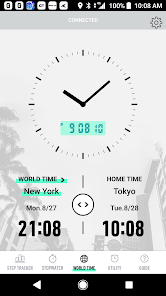
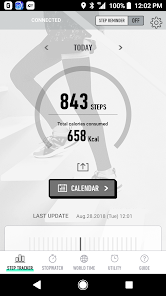
About this app
Important - Please Read
Request to Transfer to the CASIO WATCHES App (Support Termination Notification)
The functionality of this app will be transferred to the new watch app, CASIO WATCHES.
By updating to version 3.0, users of this app will be able to transfer their user data to CASIO WATCHES via this app.
While we understand this may be inconvenient for some users, we ask that you transfer your data across, and continue using CASIO WATCHES in place of this app.
Please see the support page for more details.
https://world.casio.com/support/wat/info/20230322/en/
●Description
This is the basic application for connecting and communicating with a Bluetooth(R) v4.0 enabled CASIO watch.
Pairing your watch with a smartphone enables use of a variety of different Mobile Link functions that greatly enhance the smartphone experience.
The BABY-G Connected app also simplifies certain watch operations by letting you perform them on your phone screen.
Visit the website below for details.
https://babyg.casio.com/
We recommend using BABY-G Connected on the following operating systems.
Operation is not guaranteed for any operating system not listed below.
Even if an operating system has been confirmed as compatible, software updates or display specifications may prevent proper display and/or operation.
BABY-G Connected cannot be used on Android feature phones with arrow keys.
If the smartphone is set to power saving mode, the app may not operate properly. If the app does not operate properly with the smartphone in power saving mode, please turn off power saving mode before use.
Please refer to the FAQ link below to resolve problems such as being unable to connect or operate the watch.
https://support.casio.com/en/support/faqlist.php?cid=009001019
⋅ Android 6.0 or later.
* Bluetooth installed smartphone only.
Applicable Watches: BSA-B100, MSG-B100
*Some watches unavailable in your region may be displayed in the application.
Request to Transfer to the CASIO WATCHES App (Support Termination Notification)
The functionality of this app will be transferred to the new watch app, CASIO WATCHES.
By updating to version 3.0, users of this app will be able to transfer their user data to CASIO WATCHES via this app.
While we understand this may be inconvenient for some users, we ask that you transfer your data across, and continue using CASIO WATCHES in place of this app.
Please see the support page for more details.
https://world.casio.com/support/wat/info/20230322/en/
●Description
This is the basic application for connecting and communicating with a Bluetooth(R) v4.0 enabled CASIO watch.
Pairing your watch with a smartphone enables use of a variety of different Mobile Link functions that greatly enhance the smartphone experience.
The BABY-G Connected app also simplifies certain watch operations by letting you perform them on your phone screen.
Visit the website below for details.
https://babyg.casio.com/
We recommend using BABY-G Connected on the following operating systems.
Operation is not guaranteed for any operating system not listed below.
Even if an operating system has been confirmed as compatible, software updates or display specifications may prevent proper display and/or operation.
BABY-G Connected cannot be used on Android feature phones with arrow keys.
If the smartphone is set to power saving mode, the app may not operate properly. If the app does not operate properly with the smartphone in power saving mode, please turn off power saving mode before use.
Please refer to the FAQ link below to resolve problems such as being unable to connect or operate the watch.
https://support.casio.com/en/support/faqlist.php?cid=009001019
⋅ Android 6.0 or later.
* Bluetooth installed smartphone only.
Applicable Watches: BSA-B100, MSG-B100
*Some watches unavailable in your region may be displayed in the application.
Updated on
Data safety
Developers can show information here about how their app collects and uses your data. Learn more about data safety

No information available
Ratings and reviews
3.8
699 reviews

A Google user
- Flag inappropriate
- Show review history
August 31, 2019
In the first 10 tries my watch didn't connect with the app repeatedly. Then i read, others had also complained about the same, saying that the app is broken. However, just after 2-3 hours i tried again and it worked. I don't know if this is a glitch or not but if your watch is not connecting try again after a couple of hours.
16 people found this review helpful

Kim Lindsay
- Flag inappropriate
November 7, 2021
This app is starting to annoy me as I can't get my watch to connect with my phone for more than a minute. Next time I try it doesn't connect at all and tells me I need an app to use it. What the hell does that mean. I just want to connect the watch to the phone when I want to. I have uninstaller and installed this app too many times to count and then it takes about 50 attempts to connect the watch. Seriously annoying.
2 people found this review helpful
A Google user
- Flag inappropriate
December 28, 2018
I am totally in love with my watch, but the app needs improvement itself. I have the following issues at the moment: 1. The app drains the battery of my phone (Samsung Galaxy S8+). Since I installed the app (4 days), by lunchtime I need to charge the phone again, and I'm not even using it much. 2. The app does not connect to the watch to synchronise steps. I am required to do it manually, and even after manual connection I have different numbers on my screen and in the app.
18 people found this review helpful
What’s new
Stability improved, minor bugs eliminated.
App support
About the developer
CASIO COMPUTER CO.,LTD.
app@casio.co.jp
1-6-2, HONMACHI
SHIBUYA-KU, 東京都 151-8543
Japan
+81 80-3386-9152


