Blose
3.3star
287 reviews
10K+
Downloads

Everyone
info
About this app
Wear OS app that shows glucose values from Dexcom Share or LibreLinkUp
Can also work separately as Tile and/or Complication in other watch faces.
Note! Only useful for people who are using a Dexcom CGM, and has blood sugar data uploaded to Dexcom Share or LibreLinkUp.
Note! Wear OS v5 does no longer allow apps to also have a watch face, so the watch face is not included in Wear OS 5. It's only included for Wear OS v4 and v5.
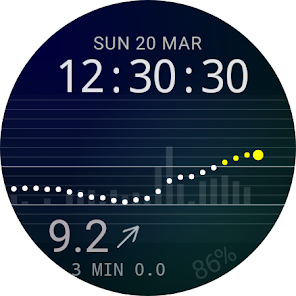
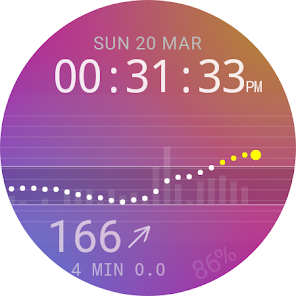
The watch face can show:
* Current glucose value in mmol/L or mg/dL
* Trend
* Graph
* Battery level
* Glucose target range
* Difference between values as bars
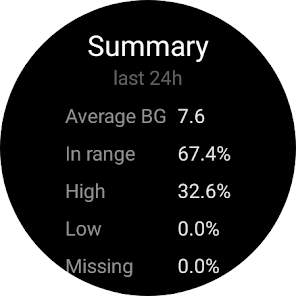
Double tap on the watch face to get to a details view
that shows average glucose during last 24h,
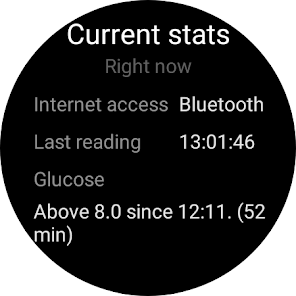
current stats, such as for how long the glucose
has been in range / above / below.
You can also access glucose graphs for 6h, 12h and 24h, and configuration from this view.
Optional vibrations can be configured for when glucose gets too high, or too low. NOTE! vibrations are just a best effort, you should still use the alarms in the official Dexcom app. Your watch might enter sleep mode, and the network connection could be down, and you won't get any vibrations in those cases.
Do note that this Watch Face doesn't require an app on the phone, but it requires access to a web browser during initial configuration, when entering Dexcom credentials.
Blose shouldn't be used instead of CGM providers official apps.
Note that there can be short delay between the CGM sending a value to sharing servers, and Blose receiving it.
The credentials are only stored on your watch, and in an encrypted format, and everything will be removed when the app is uninstalled. The credentials will only be used to login towards CGM providers sharing servers, and won't be shared with anyone.
The app does not contain any advertisement, and doesn't track, or share any data.
For Dexcom:
IMPORTANT! Dexcom share might not work for users that have phone numbers as user id. Prefixing the phone number with country code can work. This is not a bug in Blose, but a limitation in the Dexcom API.
Important note if you don't get any glucose readings!
Blose is downloading glucose readings from Dexcom Share, so sharing must be turned on in the Dexcom main app, and it might require that you have at least have one follower. You can download Dexcom follow on your phone, and invite yourself, then delete the Dexcom follow app when you start getting readings, but keep the follower invited in the main app.
For LibreLinkUp:
Blose will only automatically fetch a value every 5th minute, in order to not drain the battery. Single tap on the watch face can at any time force a download of most recent value.
Libre users that don't have a follower should create a LibreLinkUp account, and invite that user. Use the LibreLinkUp credentials when logging in in Blose.
Blose will follow the first user, if the LibreLinkUp account is following more than one user.
Note! Libre 2 in US doesn't upload values continiously, so Blose works best with Libre 3 in US. Both Libre 2 and 3 should work in Europe.
Can also work separately as Tile and/or Complication in other watch faces.
Note! Only useful for people who are using a Dexcom CGM, and has blood sugar data uploaded to Dexcom Share or LibreLinkUp.
Note! Wear OS v5 does no longer allow apps to also have a watch face, so the watch face is not included in Wear OS 5. It's only included for Wear OS v4 and v5.
The watch face can show:
* Current glucose value in mmol/L or mg/dL
* Trend
* Graph
* Battery level
* Glucose target range
* Difference between values as bars
Double tap on the watch face to get to a details view
that shows average glucose during last 24h,
current stats, such as for how long the glucose
has been in range / above / below.
You can also access glucose graphs for 6h, 12h and 24h, and configuration from this view.
Optional vibrations can be configured for when glucose gets too high, or too low. NOTE! vibrations are just a best effort, you should still use the alarms in the official Dexcom app. Your watch might enter sleep mode, and the network connection could be down, and you won't get any vibrations in those cases.
Do note that this Watch Face doesn't require an app on the phone, but it requires access to a web browser during initial configuration, when entering Dexcom credentials.
Blose shouldn't be used instead of CGM providers official apps.
Note that there can be short delay between the CGM sending a value to sharing servers, and Blose receiving it.
The credentials are only stored on your watch, and in an encrypted format, and everything will be removed when the app is uninstalled. The credentials will only be used to login towards CGM providers sharing servers, and won't be shared with anyone.
The app does not contain any advertisement, and doesn't track, or share any data.
For Dexcom:
IMPORTANT! Dexcom share might not work for users that have phone numbers as user id. Prefixing the phone number with country code can work. This is not a bug in Blose, but a limitation in the Dexcom API.
Important note if you don't get any glucose readings!
Blose is downloading glucose readings from Dexcom Share, so sharing must be turned on in the Dexcom main app, and it might require that you have at least have one follower. You can download Dexcom follow on your phone, and invite yourself, then delete the Dexcom follow app when you start getting readings, but keep the follower invited in the main app.
For LibreLinkUp:
Blose will only automatically fetch a value every 5th minute, in order to not drain the battery. Single tap on the watch face can at any time force a download of most recent value.
Libre users that don't have a follower should create a LibreLinkUp account, and invite that user. Use the LibreLinkUp credentials when logging in in Blose.
Blose will follow the first user, if the LibreLinkUp account is following more than one user.
Note! Libre 2 in US doesn't upload values continiously, so Blose works best with Libre 3 in US. Both Libre 2 and 3 should work in Europe.
Updated on
Safety starts with understanding how developers collect and share your data. Data privacy and security practices may vary based on your use, region, and age. The developer provided this information and may update it over time.

This app may share these data types with third parties
Personal info

No data collected
Learn more about how developers declare collection

Data is encrypted in transit

Data can’t be deleted
Ratings and reviews
3.8
149 reviews

A User
- Flag inappropriate
November 20, 2024
The app, in general, is nice. The watch face is uncomplicated, easy to see & understand. Alarms can be disabled, & changed from audible to vibrate. The big problem for me, is that the vibrate doesn't persist until silenced. It buzzes one short pattern and stops. I bought a smart watch to wake me silently so my wife's sleep is undisturbed. If the vibrate doesn't wake me, it's useless. I previously used Libre 3 & Juggluco, & that would just keep buzzing till I pushed a button which was much better

Alex Cutsumbis
- Flag inappropriate
January 31, 2026
I absolutely love the app. I had been working great on a Pixel 10 XL and Samsung Watch7. However, after the OneUI update, blose will stop updating as a complication after about 24 hours, not exactly 24 hours... but usually around a day, perhaps sometimes as long as 36 hours. In order to start updating again, I open the Blose app up on the watch, go to config, and then it starts to poll for reading again. I hope youre able to resolve the updating issue.

Sherry Hazeltine cotterman
- Flag inappropriate
November 18, 2025
I used to like it then all of a sudden it stopped working. my dexcom g7 user name is my phone number and I've see a lot of other reviews of this not working all of a sudden when it used to work just fine for months and months.
2 people found this review helpful
Kaj Bjurman
November 18, 2025
What watch model? What does the log say? Did the watch get an upgrade?
What’s new
Support for latest Libre API
App support
About the developer
Kaj Bjurman
kaj.bjurman@gmail.com
Sweden


