ReSound Smart 3D
4.4star
42.9K reviews
1M+
Downloads

Everyone
info



About this app
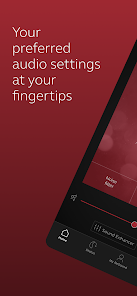
The ReSound Smart 3D app lets you control your hearing aids directly from your mobile device. You can change programs, and make simple or more advanced sound adjustments and save them as favorites. The app helps you learn what you can do and how to do it. It can even help you find your hearing aids if you lose them. Last, but not least, you can have your hearing care professional update your hearing aid programs and send you new hearing aid software without taking a trip to the clinic.
Notes: Please contact your local ReSound representative for product and feature availability in your market. We recommend that the hearing aids run the latest software version. If in doubt, please contact your hearing care professional.
ReSound Smart 3D mobile device compatibility:
Please consult the ReSound app website for up-to-date compatibility information: www.resound.com/compatibility.
Use the ReSound Smart 3D app to:
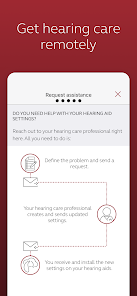
• Enjoy optimization anywhere with ReSound Assist: Request help with your hearing aid settings from your hearing care professional and receive new settings and software updates.
And use these direct control and personalization options:
• Adjust volume settings on your hearing aids
• Mute your hearing aids
• Adjust volume of your optionally acquired ReSound streaming accessories
• Adjust speech focus as well as noise and wind-noise levels with Sound Enhancer (feature availability depends on your hearing aid model and the fitting by your hearing care professional)
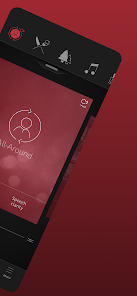
• Change manual and streamer programs
• Edit and personalize program names
• Adjust treble, middle and bass tones to your preferences
• Save your preferred settings as a Favorite – you can even tag to a location
• Monitor the battery status of your rechargeable hearing aids
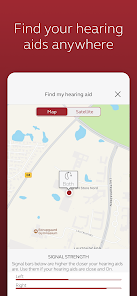
• Help locate lost or misplaced hearing aids
• Tinnitus manager: Adjust sound variation and frequency of the Tinnitus Sound Generator. Select Nature Sounds (feature availability depends on your hearing aid model and the fitting by your hearing care professional)
For more information please visit www.resound.com/smart3Dapp or the support site via the link in the app store.
Notes: Please contact your local ReSound representative for product and feature availability in your market. We recommend that the hearing aids run the latest software version. If in doubt, please contact your hearing care professional.
ReSound Smart 3D mobile device compatibility:
Please consult the ReSound app website for up-to-date compatibility information: www.resound.com/compatibility.
Use the ReSound Smart 3D app to:
• Enjoy optimization anywhere with ReSound Assist: Request help with your hearing aid settings from your hearing care professional and receive new settings and software updates.
And use these direct control and personalization options:
• Adjust volume settings on your hearing aids
• Mute your hearing aids
• Adjust volume of your optionally acquired ReSound streaming accessories
• Adjust speech focus as well as noise and wind-noise levels with Sound Enhancer (feature availability depends on your hearing aid model and the fitting by your hearing care professional)
• Change manual and streamer programs
• Edit and personalize program names
• Adjust treble, middle and bass tones to your preferences
• Save your preferred settings as a Favorite – you can even tag to a location
• Monitor the battery status of your rechargeable hearing aids
• Help locate lost or misplaced hearing aids
• Tinnitus manager: Adjust sound variation and frequency of the Tinnitus Sound Generator. Select Nature Sounds (feature availability depends on your hearing aid model and the fitting by your hearing care professional)
For more information please visit www.resound.com/smart3Dapp or the support site via the link in the app store.
Updated on
Safety starts with understanding how developers collect and share your data. Data privacy and security practices may vary based on your use, region, and age. The developer provided this information and may update it over time.

No data shared with third parties
Learn more about how developers declare sharing

This app may collect these data types
App activity, App info and performance, and Device or other IDs

Data is encrypted in transit

You can request that data be deleted
Ratings and reviews
4.4
42.3K reviews

JLJ
- Flag inappropriate
February 27, 2026
The app is pretty easy to use. However, I'm hoping for feedback on how I can make the alarms on this app silent. I was on the other side of the house after putting my hearing aids in the charger, and every minute or so my phone kept notifying me that my right hearing aide wasn't connected. A few notifications would have been fine but I received 10 - 15, at 1 min or less intervals. That's really irritating when your in the middle of doing something and your phone non stops sounds notifications.
3 people found this review helpful
GN Resound
March 4, 2026
We'd be happy to take a look into this for you, please contact the support team at resoundappsupport@gnresound.com. Thank you.

tom yochim
- Flag inappropriate
March 12, 2026
I've had Resound hearing aids for about a year. I've had to uninstall and install this app at least a dozen times. My audiologist says the app was designed for an iPhone. I have an Android. (I hope it works better than this for an iPhone) The noise filter basically just mutes everything. Try going bowling with this. It's awful. I wish I went to a different doctor who had different aids and app.
2 people found this review helpful
GN Resound
March 19, 2026
Hey,
We're sorry to hear about the difficulties you're experiencing.
Please do not hesitate to reach out to appsupport@gnresound.com so that we can provide you with further assistance.

Mark
- Flag inappropriate
March 4, 2026
Every time I open the app to adjust my hearing volume, the app takes me through the entire initial connection process which involves putting the hearing aids in the charger two times, among other things. The charger is at home and I usually am not. Then I have to agree to two lengthy consent forms. The whole process to adjust the volume takes about 10 to 15 minutes.
4 people found this review helpful
GN Resound
March 10, 2026
Hey,
We're sorry to hear about the difficulties you're experiencing.
Please do not hesitate to reach out to appsupport@gnresound.com so that we can provide you with further assistance.
What’s new
This update includes general performance and stability improvements.
App support
About the developer
Gn Hearing A/S
appsupport@gnresound.com
Lautrupbjerg 7
2750 Ballerup
Denmark
+45 45 75 22 22


